Church Center
- 4.4
- Rating
- 1.00M
- Installs
- Free
- Price

 Analysis by App-foxy
I approached Church Center less like a general social app and more like a digital front door for a church community. That distinction matters. Its purpose is not to replace every messaging, calendar, donation, or media tool a congregation might use. Instead, it brings church-related information and participation into one place, with Planning Center behind the experience. In my use, the app made the most sense when I already belonged to a church that uses the Planning Center ecosystem.
It is a free lifestyle app for Everyone, and its store summary describes it as a way to connect congregants with their church. That sounds simple, but the practical value depends heavily on the individual congregation. Church Center is not equally useful as a standalone download for someone exploring churches at random. It becomes much more relevant when your church has set up its services and invited members to use the app.
After being available since November 26, 2018, it has become a familiar option in this space. The current version is 2026.5.27, it requires Android 10 or later, and the app has passed one million installs. Its average rating is 4.4 from around 4.5 thousand ratings, with about 1.4 thousand written reviews. Those figures suggest a well-established product, although they should not be mistaken for a guarantee that every church will configure it equally well.
You May Also Like

 Blood Strike: 2.5 Anniversary
Blood Strike’s Loadouts Turn Every Drop Into a Tactical Gamble
A close look at Blood Strike’s custom loadouts: how fast access to signature weapons reshapes its battle royale rhythm, rewards preparation, and narrows the gap between fights.

 Pandora - Music & Podcasts
Pandora’s Music Is Easy to Start, but Harder to Recover
Pandora’s strength is its low-effort path from a seed to a station. Its weak spot is how much confidence it asks you to place in connection, setup, and quiet recovery.

 8 Ball Pool
 Is Built on Rivalries, Rematches, and Routine
A close look at the rivalries, rematches, shared routines, and unanswered safety questions that turn a quick pool match into a persistent mobile community.

 Samsung Music
’s Quiet Strength Is Playing What You Already Own
Its reach comes less from spectacle than from dependable access to a personal library. That simplicity is both the app’s strongest retention engine and its ceiling.

 AccuWeather: Weather Radar
AccuWeather Review: A Quick, Clear Forecast for Everyday Decisions
For everyday plans, the best forecast is the one you can understand quickly. AccuWeather makes rain timing, radar, and local conditions easy to act on, with a few trade-offs.

 Hill Climb Racing
Why Hill Climb Racing Still Turns Crashes Into One More Run
A tiny car, a bumpy hill and one more upgrade: Hill Climb Racing keeps resurfacing because its simple chaos makes every near-miss feel personal.
More From Our News Desk



Trust starts with knowing what the app is actually for
The first trust question is whether the app has a clear role. Here, the answer is reasonably clear: Church Center is intended to connect people with their church, not to act as a broad public network. That narrower purpose is helpful because it sets a sensible expectation around the information you may encounter. You are dealing with church-specific content and participation rather than an endless stream of unrelated recommendations.
In everyday use, I would expect the app to be most helpful for someone who wants a convenient way to stay connected with a congregation between Sunday services. A parent may use it to keep track of church activities, a volunteer may need access to information connected with serving, and a newer attendee may want an easier route into the church’s digital organization. The exact experience still depends on what that church has enabled, so the app should be judged as a connection layer rather than a complete church-management system visible in the same way to everyone.
That dependency is one of the most important details to understand before installing it. If your church does not use Planning Center or has not made relevant information available through Church Center, the app may feel sparse. This is not necessarily a malfunction. It is a sign that the app’s usefulness is shared between the software and the congregation’s setup. A beautifully designed app cannot create current events, accurate contact details, or active groups if the organization has not maintained them.
I also appreciate that the developer is identified plainly as Planning Center. That gives the app a recognizable point of responsibility instead of making it look like an anonymous community tool. For a service involving church participation, account access, and potentially personal details, knowing who operates the product is part of forming a sensible level of trust.
What I would check before relying on it
My first practical step would be to search for my church inside the app and confirm that the correct congregation appears. Churches can have similar names, multiple campuses, or separate communities in the same area. Selecting the wrong one could create confusion that looks like an app problem but is really an account or organization-selection issue.
I would also compare the information in Church Center with the church’s usual communication channel during the first few weeks. If service times, event details, or contact information differ, I would treat the app as a convenient supplement until the church confirms which source is current. This is a useful habit with any organization app: convenience should not replace basic verification when plans affect children, travel, volunteering, or attendance.
Another sensible check is whether the app is genuinely needed for your routine. If you only attend occasionally and receive everything important through email or a public website, installing another account-based app may add little. If you regularly participate in church life, however, having a single place to start can reduce the need to search through old messages.
Account controls deserve attention
Church-related applications can touch personal areas of life, so I would not rush through sign-in. I would read each screen carefully, use the account associated with my church involvement, and avoid creating duplicate profiles unless the app clearly requires it. Duplicate accounts are especially inconvenient when an organization needs to connect a person with a group, event, or volunteer activity.
My advice is to treat the account as an identity connection, not merely a way to unlock a menu. Use an email address or sign-in method you can continue to access, and keep your contact details current if the app gives you a profile area. That makes it easier for the church to recognize the right person and reduces confusion when someone changes phones or moves between congregations.
I would also look for visible options to review or adjust personal information rather than assuming everything is fixed permanently. The most trustworthy experience is one in which the user can see what is being shared, correct mistakes, and make deliberate choices about participation. If a screen asks for information that does not seem relevant to the way I plan to use the app, I would pause and ask the church why it is needed before proceeding.
This is where Church Center’s value should be assessed carefully. A centralized app can be more convenient than scattered tools, but centralization also means that a user should understand the account relationship. The app may be the place where you discover information, while the church remains the organization deciding what is published and how members are managed. Those are separate responsibilities, and keeping them separate helps avoid unrealistic expectations.
Where privacy questions naturally appear
The most sensitive moments are not necessarily the first time you open the app. They can occur when you join a group, respond to an event, volunteer, or update a profile. At those points, I would slow down and inspect the wording around visibility and participation. A church community may be warm and familiar, but personal information still deserves the same care I would give it in any other app.
For example, before submitting information for an event, I would check whether I am simply registering myself, indicating interest, or making details visible to organizers or other participants. Those actions can feel similar from a user’s perspective while having different consequences. If the app presents a confirmation screen, I would read it instead of tapping through automatically.
The same caution applies to family-related use. Parents and guardians may be dealing with information connected to children, pickups, activities, or group participation. I would confirm exactly whose profile is being selected and who is responsible for maintaining the information. A small account-selection mistake can create unnecessary confusion, especially in a busy church environment with several simultaneous activities.
I would also separate communication convenience from permission to receive everything. If the app offers notification choices, I prefer to enable only the alerts that help me act: an important schedule change, a response connected with something I joined, or information I have deliberately requested. Excessive notifications can make a useful community tool feel intrusive, while carefully chosen alerts keep it practical.
Because the app is free, the main decision is not a purchase decision. It is a participation and information decision. I would still consider what details I am entering, why I am entering them, and whether the church has explained how the information will be used. Free does not automatically mean frictionless or consequence-free; it simply removes the price barrier.
Useful workflows beyond simply checking announcements
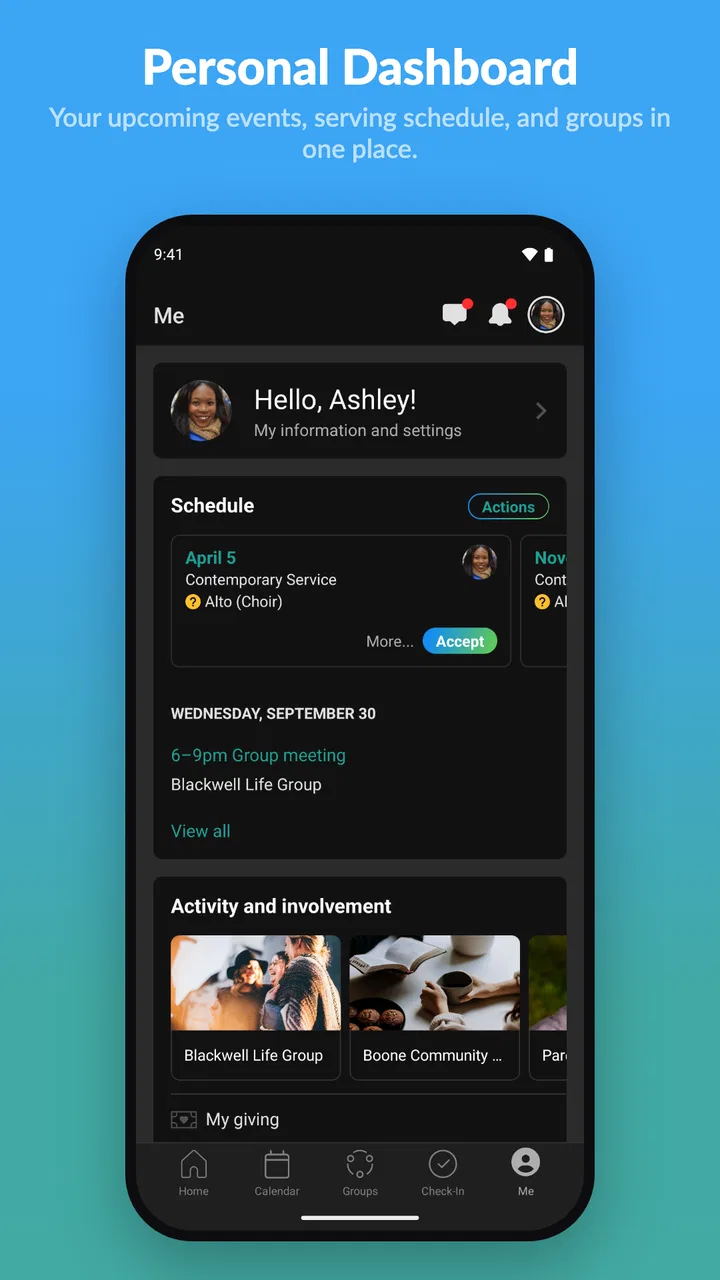
One of the less obvious strengths of Church Center is that it can become a personal starting point for church involvement rather than just a notice board. I would use it at the beginning of the week to review what requires a response, then return only when I need to act. That is more efficient than repeatedly searching through email threads or social posts for the same detail.
A second useful workflow is to use the app as a confirmation checkpoint. If I have agreed to attend something or help with an activity, I would revisit the relevant information shortly before the day itself. This is especially helpful when plans change after an initial announcement. The app does not remove the need for common sense, but it can give me a more organized place to check the details my church has chosen to publish.
A third insight is that the app can reveal whether a church’s digital communication is well maintained. If information is current, clearly labeled, and easy to find, Church Center feels like a helpful bridge between the organization and its members. If pages are outdated or responsibilities are unclear, the app exposes that weakness rather than solving it. In that situation, I would contact the church directly instead of assuming the app contains the complete picture.
For volunteers, the trade-off is particularly noticeable. A dedicated church app can be more focused than a general calendar because it keeps participation connected to the organization. However, it may not replace a personal calendar, reminders, or direct communication with a coordinator. I would copy genuinely important commitments into my normal calendar rather than trusting one app to be my only memory aid.
How it compares with familiar alternatives
Compared with a church website, Church Center can feel more personal because it is designed around a congregation and its members rather than public visitors alone. A website is often better for someone researching a church for the first time, checking basic beliefs, or finding public contact information. The app is more appropriate once I have an ongoing relationship and need member-oriented access.
Compared with email, the app can reduce the problem of buried messages. Email remains better for detailed explanations, formal communication, and keeping a searchable written record. Church Center is better when the information is connected to an activity or church workflow and I want to return to it without digging through an inbox.
Compared with general social platforms, its narrower purpose is a benefit. I am less likely to be distracted by unrelated content, and the context is clearer. The downside is that the app cannot provide the broad reach or informal conversation that a church may already get from familiar social tools. I would not expect it to replace every community channel.
Compared with a paper bulletin or printed schedule, the app is easier to update, but it is less accessible to people who do not use smartphones comfortably. That matters for multigenerational congregations. A church that relies on Church Center should still offer a human alternative for people who prefer in-person help or printed information. The app works best as an additional doorway, not the only doorway.
Who should use it, and who may want another option?
I think Church Center is a strong fit for people whose church actively uses Planning Center and expects members to interact with digital information. It is also a good match for anyone who wants a focused place to begin when checking church activities, personal participation, or congregation-specific updates. The free price makes trying it low-risk, provided the church is actually present and active in the app.
I would be more cautious if I were only browsing churches, rarely attending, or already satisfied with a well-maintained website and direct email communication. In those situations, the app may add another login without solving a real problem. I would also hesitate to depend on it if my church does not keep its information current or if important communication is still handled elsewhere.
People who are especially careful about digital accounts should install it only after understanding the church’s expectations and reviewing each visible choice during setup. That does not mean avoiding the app. It means using it deliberately, especially when joining groups, registering for activities, or entering information about family members.
My cautious verdict after using it
Church Center succeeds when it stays in its lane: helping a church community organize access and participation in a more convenient way. I found its focused identity more reassuring than an app that tries to become a general-purpose social network. Planning Center gives it a clear developer identity, and the established user base shows that many people find the approach worthwhile.
Still, I would not judge it only by the polished parts of the app. The real experience depends on the church’s administration, the accuracy of its content, the clarity of its account practices, and the choices presented when personal information is involved. Those factors determine whether the app feels like a trusted connector or merely another place to check.
My recommendation is therefore conditional but positive: install it if your church actively uses it, begin with the minimum information and notifications you need, and verify how participation and visibility work before submitting sensitive details. Keep another calendar or communication route for important commitments. Used that way, Church Center is a practical companion for an engaged congregant, not a universal replacement for every church communication method.
For Android users on version 10 or newer, the app is free and rated for Everyone. I would give it a try when the congregation itself points members toward it. If your church is not using the platform, or if you prefer public websites and direct human contact, skipping it may be the more sensible choice. The app is at its best when it supports a real relationship that already exists, with the user remaining in control of what they share and how closely they rely on the digital channel.
FAQs for Church Center
01What features does the Church Center App offer?
The Church Center App provides a variety of features designed to enhance your church experience. It includes tools for managing event registrations, giving donations, joining groups, and checking in to events. Additionally, it offers a personalized dashboard for tracking your activities and staying connected with your church community.
02Is the Church Center App free to use?
Yes, the Church Center App is free to download and use. However, some features, like event registrations or donations, may involve costs depending on your church’s specific setup. It's advisable to check with your church for any associated fees or contributions required when using certain features.
03How secure is my data on the Church Center App?
The Church Center App prioritizes user security and data privacy. It employs encryption protocols to protect personal information and financial data during transactions. Always ensure you download the app from official sources and enable any security features recommended by your church to enhance protection.
04Can I use the Church Center App without an internet connection?
While the Church Center App requires an internet connection for most of its functionalities, such as event registrations and donations, you can access some offline features. These might include viewing previously downloaded content or your upcoming events. However, a stable connection is recommended for optimal use.
05How do I troubleshoot issues with the Church Center App?
If you encounter issues with the Church Center App, start by checking your internet connection and ensuring the app is updated to the latest version. Restarting your device can also help. For persistent problems, contact your church's support staff or refer to the app’s help section for guidance and troubleshooting tips.
Pros
- User-friendly interface for easy navigation.
- Seamless integration with church events.
- Secure donation processing feature.
- Customizable notifications for updates.
- Includes group and volunteer management.
Cons
- Limited customization options.
- Requires internet connection to function.
- Some features behind paywall.
- Occasional sync issues reported.
- Limited support for smaller congregations.

Church Center
Gallery